Help desk automation uses rules, triggers and AI to handle tickets without a person touching them. It covers three distinct jobs: answering repeat questions, routing and enriching tickets on arrival, and resolving a narrow set of requests end to end. Most teams only buy the first and leave the cheapest wins untouched.
TL;DR
- Three kinds of automation exist here, and the dull rules-based kind pays back faster than the AI kind.
- Routing and enrichment need no AI at all, work the day you configure them, and never produce a wrong answer.
- Auto-resolution should start with one request type that has a single correct outcome, not with your highest volume.
- Anything touching security permissions, payroll data or device wipes stays with a person regardless of how reliable the automation looks.
- The failure mode is silent: an automation that stops firing announces nothing, so every rule needs one count somebody reads.
The three kinds of help desk automation
They get sold as one thing and they are not. Answering handles the question so no ticket is created, which is what an IT support chatbot does. Routing and enrichment takes a ticket that has arrived and puts it in the right queue with the right priority and the right context attached. Auto-resolution completes the request itself, start to finish, with no person involved.
The order matters, because the middle one is cheapest and most reliable and is routinely skipped. Routing is deterministic. It needs no model, cannot hallucinate, and works correctly on the day you configure it. For a distributed team the enrichment half is worth more than it sounds: a ticket arriving with the person’s location, device and manager attached saves the two message exchange that otherwise precedes any work.
Auto-resolution is the one everybody wants and the one to approach last. It is valuable in a narrow band and risky outside it.
Start with routing, not with AI
If you have not automated routing, that is where the fastest return sits. Most help desks route by hand far longer than they need to, usually because somebody senior triages the queue each morning and that habit never gets questioned.
Picture a 160-person company across four time zones with one shared IT inbox. Somebody triages at 9am London time, so a request raised in Singapore at 2pm local waits nineteen hours. No AI is needed to fix that. A rule assigning by region and category removes the entire wait.
What to do:
- Pull last month’s tickets and group them by the queue they ended up in, not the queue they arrived in.
- Any pattern that appears more than ten times is a routing rule you can write today.
- Attach location, device, operating system version and manager automatically at intake.
- Set priority from the request type rather than from the words the employee chose.
- Route by coverage window so an overnight ticket lands with whoever is actually working.
Which tickets are safe to resolve automatically
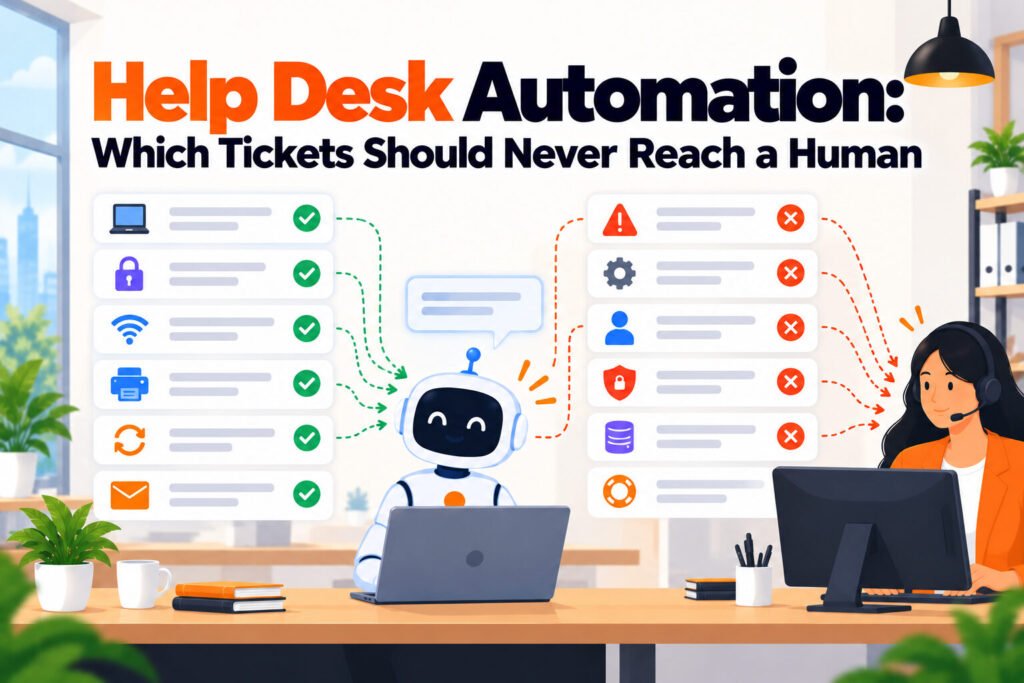
The test is not volume. It is whether the request has exactly one correct outcome that does not depend on judgement about the person asking. Volume tells you what to fix eventually; single correct outcome tells you what is safe to fix now.
Three request types pass that test in almost every company. Password and multi-factor resets, where identity verification is handled by the identity provider rather than by your rule, which is why Okta and similar tools are the right place for this rather than the help desk. Access to a standard application that everybody in a given role already gets, where the only question is whether the requester holds that role. Status questions, such as where a shipped laptop is or whether a request was approved, which are lookups rather than decisions.
Three stay with a person no matter how good the automation looks. Anything granting a security permission beyond the standard role, because the cost of a wrong grant is not symmetrical with the cost of a short wait. Anything touching payroll or personal data. And any destructive device action, including remote wipe and factory reset, where an automation triggered by a mistaken signal destroys something nobody can restore.
Checklist:
- Does the request have one correct outcome regardless of who asked.
- Is the verification done by a system of record rather than by your rule.
- Can the action be reversed within an hour if it fires wrongly.
- Would a wrong outcome cost more than a two hour wait.
- Can you name the person who will notice if it stops firing.
Where automation quietly breaks
Automation does not fail loudly. It fails by stopping, while everything around it continues to look normal. A routing rule that no longer matches because a category was renamed simply stops matching, and tickets pile into a default queue nobody watches. An integration token expires and the enrichment step silently attaches nothing.
That is the difference between a programme that holds for years and one that degrades into rules nobody will touch. Every rule needs one number that moves when it breaks, and one person reading it weekly. Not a dashboard. A single count, such as tickets landing in the default queue.
The second quiet failure is scope creep in auto-resolution. A rule written for one narrow case gets widened twice, each time reasonably, until it is firing on requests nobody evaluated. Review the firing rate of every auto-resolution rule monthly and treat a sharp rise as a defect to investigate rather than a success to celebrate.
What it costs
Routing and enrichment are normally included in the service desk you already pay for, so the first phase costs configuration time rather than money. Check your current tier first, because the capability is frequently present and unconfigured.
For the answering layer, published prices verified on 5 October 2026: Freshservice is $19 per agent per month on annual billing with its Freddy AI add-on a further $29 per agent, Zendesk is $55 per agent per month on Suite Team billed yearly with Copilot a further $50 per agent, Crisp starts free and then $45 a month per workspace, and Matram is $29 a month flat with unlimited seats. Intercom charges $0.99 per Fin resolution, which is the one model that scales with success rather than headcount. Moveworks publishes no rate card.
Matram is owned by the same people who publish PeopleOpsHQ. It answers from your documents and does not act: it will not route, enrich or resolve anything inside your service desk, and it has no free tier. Of the three jobs here it covers the first and neither of the others.
Measuring it properly
Tickets closed is the wrong number and it is the one most teams report. An automation that closes a ticket the employee then reopens has not resolved anything, and on a closure chart it looks like a win.
Track touches per ticket instead, meaning how many times a human had to interact with it. It falls when automation works and stays flat when it is only shuffling tickets between queues. Pair it with reopen rate within 48 hours, which catches closures that were not resolutions.
Final Thoughts
- Automate routing and enrichment first. It is deterministic, usually already paid for, and cannot produce a wrong answer.
- Pick auto-resolution candidates by single correct outcome, not by volume.
- Keep security permissions, payroll data and destructive device actions with a person permanently.
- Give every rule one count and one named reader, because the failure mode here is silence rather than error.
- Measure touches per ticket and 48 hour reopen rate. Tickets closed will flatter you.
- Check what your current service desk tier already includes before approving any new spend.
Frequently Asked Questions
What is help desk automation?
It is the use of rules, triggers and AI to handle support tickets with no person involved, across three distinct jobs. Answering deals with the question so that no ticket is created. Routing and enrichment places an arriving ticket in the correct queue with context attached. Auto-resolution completes a narrow set of requests end to end. The middle one is the cheapest and most reliable, because it is deterministic rather than predictive.
Which tickets should be automated first?
Automate routing and enrichment for everything, then pick auto-resolution candidates on the single correct outcome test rather than on volume. Password and multi-factor resets qualify in most companies because the identity provider handles verification, as does access to an application everybody in a role already receives. High volume request types that depend on judgement about the person asking are the wrong place to start.
What should never be automated in IT support?
Three categories should stay with a person. Anything granting a security permission beyond somebody’s standard role, because a wrong grant costs far more than a short delay. Anything touching payroll or personal data. And any destructive device action such as a remote wipe, where an automation firing on a mistaken signal destroys data nobody can recover. That is a reading of asymmetric risk rather than a lack of ambition.
Do we need AI for help desk automation?
No, and the most reliable parts of it involve none. Routing rules, priority assignment, enrichment at intake and escalation timers are all deterministic, meaning they do exactly what you configured and cannot invent an answer. AI becomes useful for the answering layer, where the input is an employee’s unpredictable phrasing. Exhaust the deterministic automation first, since it is usually included in your existing licence and carries no accuracy risk.
How much does help desk automation cost?
Routing and enrichment are typically included in the service desk you already run, so the first phase costs configuration time rather than money. For the answering layer, verified 5 October 2026: Freshservice $19 per agent per month annually with Freddy AI a further $29, Zendesk $55 per agent per month with Copilot a further $50, Crisp free then $45 a month per workspace, and Matram $29 a month flat with unlimited seats. Intercom charges $0.99 per Fin resolution, and Moveworks publishes no rate card.
How do we know an automation has stopped working?
Only by watching a number, because this category fails silently rather than with an error. A routing rule whose category was renamed stops matching and tickets accumulate in a default queue, and an expired integration token means enrichment attaches nothing while every ticket still looks normal. Pick one count per rule that moves when the rule breaks, and give one named person responsibility for reading it weekly.