TL;DR
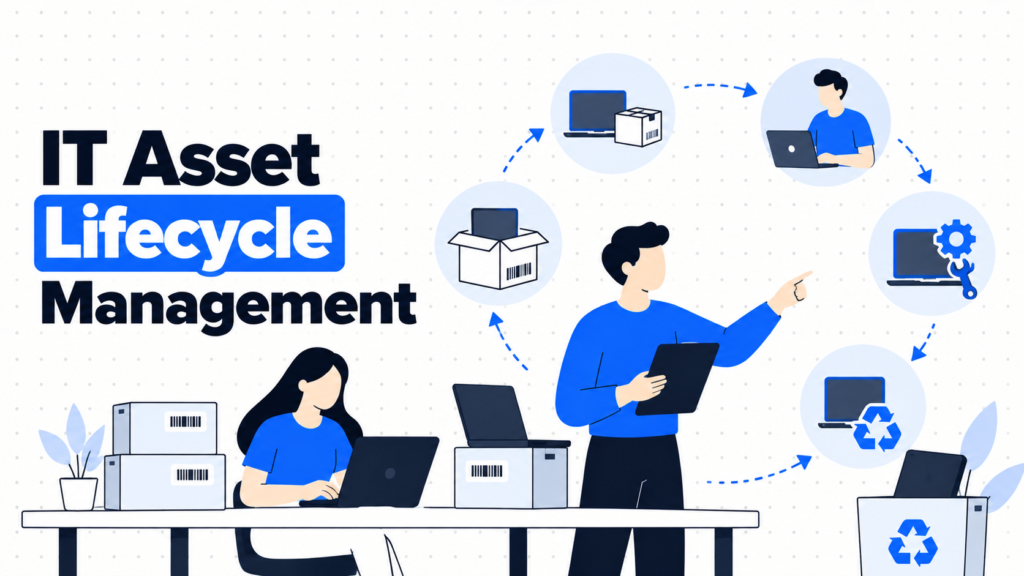
- IT asset lifecycle management is running every device through six stages, plan, procure, deploy, maintain, retire and dispose, with a clear owner and a clean record at each one.
- If you buy a few laptops a year for one office and keep them until they die, you don’t need a lifecycle program. Buy, record, replace.
- It does four jobs: plans purchases from real data, captures each device’s record at the right moment, keeps devices productive, and retires them with proof.
- Companies run the lifecycle in-house, through leasing or Device-as-a-Service, or with a lifecycle platform that handles procurement and logistics.
- The record is what connects the stages. Lose it at one stage and every later stage suffers.
- Done right, refreshes are planned a quarter ahead instead of triggered by broken laptops.
The CFO asks why hardware spend jumped 40% this year. The answer is uncomfortable. A batch of 80 laptops bought in 2022 all hit their limits at the same time, warranties expired the same month, and nobody had a plan. Half the fleet was replaced in a scramble at full price, with express shipping, while 14 perfectly usable laptops sat unassigned in a cupboard because the inventory said they were deployed.
Every growing company hits this. Devices are bought in bursts when hiring spikes, so they also age in bursts. Warranty dates live in vendor emails. Retired laptops are wiped “when someone has time.” Each stage works on its own, but nothing connects them.
The real issue isn’t any single stage. It’s that the record of each device breaks between stages, so planning, budgeting and retirement all run on guesses. That’s what IT asset lifecycle management is supposed to fix.
When You Don’t Need a Lifecycle Program
When it’s small and simple. One office, a handful of laptops bought a year, kept until they fail. A simple inventory with purchase dates is enough.
When friction shows up. Hiring comes in waves, laptops ship to homes, and nobody knows which devices are due for replacement. Budget surprises start.
When it becomes a liability. Finance needs forecasts, auditors need proof of disposal, and leased devices come with return deadlines. Missing a stage now costs money.
The edge case: devices bought in one burst. If you hired 60 people in one quarter, 60 laptops will age together. Without a plan, they’ll all need replacing in the same quarter too.
What IT and Finance Actually Need from Lifecycle Management
“What do we need to buy next quarter, and why?”
A forecast built from hiring plans, refresh dates and warranty ends.
Finance trusts numbers that come from device records, not from gut feeling.
“Are we buying the right devices?”
Two or three standard models per role, reviewed yearly.
Standard models simplify support, spares and resale.
“Is each device still doing its job?”
Health, repair history and warranty status per device.
A laptop with three repairs in a year is cheaper to replace than to keep fixing.
“When should we retire it?”
A refresh policy, often three to four years for laptops, with exceptions for heavy users.
Retiring at the right time keeps resale value higher and support tickets lower.
“Can we prove what happened at the end?”
A data destruction or disposal certificate attached to every retired record.
Without proof, the lifecycle doesn’t really end. It just goes quiet.
The Six Stages of the IT Asset Lifecycle
- Plan. Forecast needs from hiring plans, refresh dates and repair data. Owner: IT with finance. Record: planned purchases by quarter.
- Procure. Buy standard models through approved channels. Owner: procurement or IT. Record: purchase order, cost, vendor, warranty terms, created the day the order ships.
- Deploy. Configure, enroll in MDM, encrypt and assign. Owner: IT. Record: assigned person, location, MDM and encryption status. See zero-touch onboarding for how to automate it.
- Maintain. Support, repair, patch and reassign. Owner: IT. Record: repair history, warranty claims, owner changes.
- Retire. Recover the device and decide its next step: redeploy, resell, donate or recycle. Owner: IT with People Ops. Record: return date and condition. See remote device retrieval.
- Dispose. Wipe or destroy data and dispose responsibly. Owner: IT with an ITAD provider. Record: certificate per serial number. See our IT asset disposition guide.
The Three Ways to Run the Lifecycle
1. Buy and manage in-house
What it is: You buy devices, configure them, track them and handle retirement with your own team and tools.
When it’s right: Companies with an IT team, mostly office-based devices and capital to buy hardware upfront.
When it fails: Logistics. Shipping to homes in several countries, storing spares and recovering devices from leavers can swamp a small team.
2. Leasing or Device-as-a-Service
What it is: Monthly payments for devices, often bundled with support and refresh, from manufacturers or resellers. Compare options on our Device-as-a-Service tools page.
When it’s right: Companies that want predictable monthly costs and built-in refresh cycles.
When it fails: Return deadlines and damage fees. If you lose track of leased devices, end-of-term costs pile up.
3. Lifecycle platforms
What it is: Services that procure, ship, store, retrieve and dispose of devices for you, with a dashboard. Compare them on our laptop procurement platforms page.
When it’s right: Remote-first teams hiring across several countries without warehouse space or a large IT team.
When it fails: Their dashboard becomes another record. Reconcile it with your own inventory, or you’ll have two versions of the truth.
How to Choose: Five Questions Before You Plan Your Next Refresh
When were your devices bought? Group the fleet by purchase quarter. Any big cluster is a future replacement spike you can smooth out by refreshing some devices early.
How long do your laptops actually last? Look at repair and replacement data, not the vendor’s brochure. Our laptop refresh cycle policy guide helps set the right interval.
Do you want to own or rent? Owning keeps more resale value and needs capital. Leasing smooths costs and adds return obligations. Pick based on how your finance team prefers to spend.
Where do devices live? If most are in homes across countries, logistics is the hardest stage, and a lifecycle platform may save more than it costs.
Who owns each stage? Write it down. Most lifecycle failures happen at handoffs, especially between retire and dispose.
Five Lifecycle Options Worth Knowing
Firstbase
Best for: Remote teams that want procurement, deployment, storage and retrieval handled for them.
Why companies choose it: One platform covers ordering, shipping to homes, storing returned devices and redeploying them.
Where it struggles: Final disposal is often handled with partners, so check which certificates you’ll receive.
GroWrk
Best for: Companies hiring in many countries that need local delivery and returns.
Why companies choose it: International coverage for procurement, storage and retrieval, with an inventory dashboard.
Where it struggles: Another dashboard to reconcile with your own records each month.
Deel IT
Best for: Companies already using Deel for global hiring.
Why companies choose it: Device procurement and management tied to the same platform used for contracts and payroll, built on Deel’s acquisition of Hofy.
Where it struggles: Most valuable if you use Deel for people operations too.
Manufacturer Device-as-a-Service (Lenovo, HP)
Best for: Companies that want monthly pricing and a set refresh schedule from one brand.
Why companies choose it: Predictable costs with refresh and support bundled in.
Where it struggles: You’re tied to one brand, and end-of-term returns need careful tracking.
Snipe-IT
Best for: Keeping your own lifecycle record no matter who supplies or ships devices.
Why companies choose it: Free when self-hosted, with fields for purchase details, warranty and depreciation, plus assignment history.
Where it struggles: It records the lifecycle but doesn’t run logistics. Pair it with your suppliers and an MDM.
The Decision Table: Which Lifecycle Model Fits
| Situation | Scale / Size | Setup | Primary Pain | Recommended Starting Point |
|---|---|---|---|---|
| Small office, few purchases | Under 50 people | In-office | Nothing urgent | Inventory with purchase dates, buy as needed |
| Office-based, IT team in place | 100 - 500 people | Mostly in-office | Unplanned refresh spikes | In-house lifecycle with Snipe-IT and a refresh policy |
| Predictable monthly costs wanted | 100+ people | Any | Capital spend swings | Manufacturer Device-as-a-Service |
| Remote-first, many countries | 50 - 500 people | Home-based | Logistics overload | Firstbase or GroWrk |
| Global hiring on Deel | Any | Remote | Contracts and devices in different tools | Deel IT |
Most teams land in two or three of these rows at once. Start with your biggest failure and layer from there.
The Cost of Getting the Lifecycle Wrong
The biggest cost is the replacement spike. Devices bought together fail together, and buying 80 laptops in one rush means full prices, express shipping and no time to negotiate. A spread-out plan avoids almost all of it.
The quieter costs are scattered across stages. Devices kept too long generate more support tickets and lost hours. Devices retired too late lose resale value. Leased laptops returned late or damaged bring fees. And devices that never get a disposal certificate stay open as audit risks for years.
So ask one question about your current setup. Which stage loses the record most often, procurement, retirement or disposal? Fix that handoff first.
When You’re Ready to Move Beyond Buy-and-Replace
You’ve outgrown buy-and-replace when hardware spend swings wildly year to year, when finance asks for forecasts, or when devices are spread across homes in several countries.
At that point, a written lifecycle with an owner per stage, a refresh policy and one record that follows each device from purchase to certificate turns hardware into a planned cost.
If that’s where you are, it’s worth looking at dedicated tools in this space. Our guides to device lifecycle management and IT asset management cover the next steps.
Frequently Asked Questions
What is IT asset lifecycle management?
It’s managing every IT device through its full life, from planning and purchase to deployment, maintenance, retirement and disposal, with a clear owner and record at each stage.
What are the stages of the IT asset lifecycle?
The common six are plan, procure, deploy, maintain, retire and dispose. Some models split out stages like receiving or redeploying, but the idea is the same.
How is this different from device lifecycle management?
They overlap heavily. Device lifecycle management often focuses on day-to-day operations like provisioning and refresh, while IT asset lifecycle management emphasizes the record, cost and ownership at each stage. Our device lifecycle management guide covers the operational side.
How often should laptops be replaced?
Most companies replace laptops every three to four years, sooner for heavy users like engineers or designers. Base the interval on your own repair and performance data.
Is leasing laptops better than buying?
It depends on how your company prefers to spend. Leasing gives predictable monthly costs and built-in refresh, while buying keeps resale value and avoids return fees.
Who owns the IT asset lifecycle?
IT usually owns the process and the record, with finance owning cost and depreciation, procurement owning purchasing and People Ops triggering joins and leaves.
Six stages, one record, no surprise refreshes.