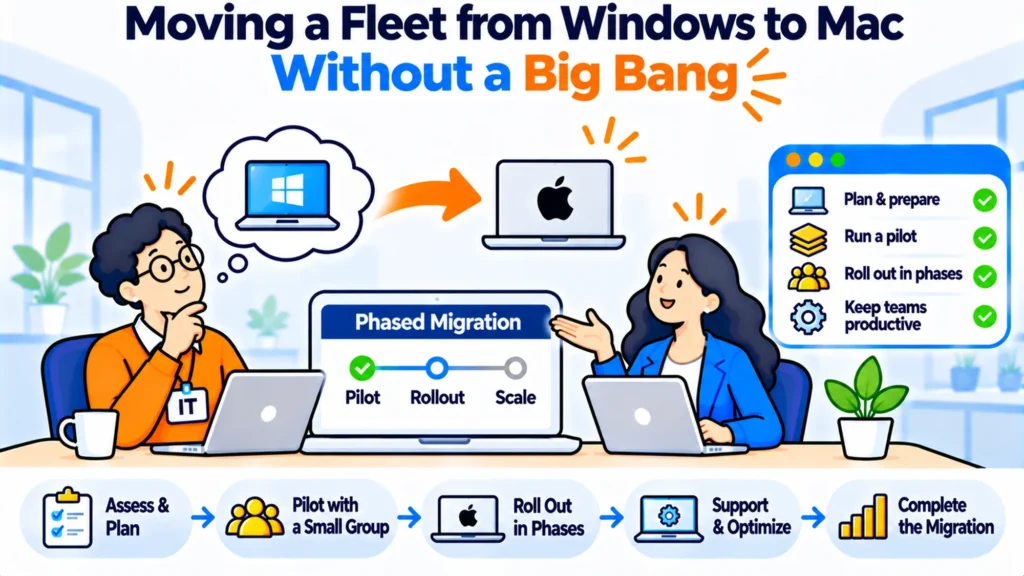
Most Windows to Mac migrations are decided on preference and then run into three things nobody wrote down: a line-of-business application that has no Mac version, an imaging process built for one platform, and a support team that now has to know both. The hardware is the easy part.
TL;DR
- The blocker is almost never the hardware. It is one or two applications and the process built around the old platform.
- Audit applications before you order anything, and ask what each one actually needs rather than what it runs on today.
- Run a mixed estate deliberately for a year or two. A hard cutover is the expensive way to do this.
- Enrolment and imaging have to work on day one, because a Mac that arrives unmanaged becomes a permanent exception.
- Budget for the support cost of knowing two platforms, which is the part that gets left out of every business case.
- Decide what happens to the Windows machines before they start coming back, or you acquire a cupboard.
Start with the applications, not the devices
Every migration that goes badly went badly for the same reason. Somebody ordered the machines first, and the application audit happened afterwards, by which point there was hardware on desks and a problem that could only be solved with a workaround.
Do the audit first. List every application in use, who uses it, and whether it has a native Mac build, a browser version, or neither. The third category is the only one that matters and it is usually shorter than people fear. Two or three applications, often finance or engineering tooling, sometimes a piece of hardware-attached software for a label printer or a lab instrument.
Then ask a better question about each one. Not whether it runs on Mac, but what the person actually needs it for, because the answer is sometimes a report that could be produced another way, and sometimes a daily workflow with no substitute at all. Those two cases have completely different costs and lumping them together is what produces a migration plan nobody can price.
What to do:
- List applications by user, not by licence count.
- Mark each one native, browser-based, or blocked.
- For every blocked one, name the person who depends on it and what they use it for.
- Decide per application: replace, access remotely, or leave that user on Windows.
A mixed estate is the answer, not a failure
The instinct is to pick a date and move everyone. Resist it. A hard cutover forces you to solve every edge case at once, under time pressure, and the edge cases are exactly the ones that need a conversation rather than a decision.
Run both. It’s cheaper and calmer than a cutover. New starters get Macs, refreshes get Macs, and the people with a genuine Windows dependency keep what they have until the dependency goes away or somebody solves it properly. The fleet converts itself at the speed of your normal replacement cycle, which costs almost nothing extra because you were buying those machines anyway.
There’s a real cost to the mixed state and it isn’t the hardware. It’s that every process now has two versions: two builds, two enrolment paths, two sets of new starter instructions. Budget for that explicitly rather than discovering it.
Enrolment has to work before the first machine lands
This is where migrations quietly go wrong. The first few Macs arrive, nobody has finished the management setup, so they get handed over configured by hand with a promise to enrol them later. Later doesn’t come, and two years on you have 14 machines that were never brought under management and nobody is quite sure which ones they are.
Get automated enrolment working on one machine before ordering the rest. That means the devices are bought through a channel that supports it, the management platform is configured, and a new machine out of the box lands in the right state without anybody touching it. Prove it once. Then order.
And check the purchasing route specifically, because it is the step that catches people. Devices generally have to be bought through the manufacturer or an enrolled reseller to appear in automated enrolment, so a machine bought from a general retailer to fill a gap quickly becomes the exception that has to be set up by hand.
A company that did it over 18 months
A 94-person company decided to move to Mac after its engineering team asked for it. The application audit found 37 applications in use and exactly two with no Mac or browser option, both in finance.
They didn’t solve those two. They left the finance team of six on Windows, moved everybody else as machines came up for refresh, and revisited the finance question 18 months later when one of the two vendors shipped a browser version. The migration cost them no additional hardware spend, because every machine replaced was due anyway, and the only real new cost was a second build to maintain and about three weeks of support learning curve.
The thing they got right was not treating the finance exception as a problem to be solved before starting. It was a reason for six people to stay where they were, which is a different and much cheaper conclusion.
Decide what happens to the Windows machines
This gets forgotten until the returns start arriving. Machines come back over months, in varying condition, and with no decision about where they go they end up in a cupboard that gradually becomes somebody’s problem.
Triage on arrival, same as any return. Some have useful life and can serve as spares for the remaining Windows users, which is genuinely valuable because those users are now a shrinking minority with no refresh pipeline of their own. The rest go to disposal or resale, and the decision is easier to make in the first week than in the second year.
Keep a cap on the spare count. A migration generates more returns than a normal year, so the usual limits get overwhelmed and the honest answer for most of it is disposal.
Where a lifecycle platform helps, and where it does not
A migration is two logistics problems running at once: new machines going out, old machines coming back, across however many countries you operate in. That’s the part a platform addresses.
RemoAsset is our own product. Its relevance here is specific. It handles procurement and retrieval across 80+ countries and records each device through issue and return, which is what you need when both flows are running simultaneously and the register has to stay correct throughout. Pricing is published, from $1,499 a year on the Subscription tier for companies with 50 to 5,000+ employees, including a 60 per cent reduction on retrieval charges.
Its limits matter here more than usual. It has no network discovery, so it won’t find the machines that were never enrolled, which is the main risk this article is about. It has no software licence management, so the application audit is work you do yourself. And only the Subscription tier publishes a figure, with pay-as-you-go quoted. It is not a management platform and does not enrol or image anything.
Workwize, Firstbase, GroWrk, allwhere and Deel IT operate on broadly similar lines, and not one of the five publishes a rate card you can plan against. The live Workwize domain is goworkwize.com.
Checklist before you order
Checklist:
- Application audit complete, with blocked applications named by user.
- Automated enrolment proved on one machine, end to end.
- Purchasing route confirmed as one that supports automated enrolment.
- A decision recorded for each blocked application: replace, remote access, or stay on Windows.
- Returns destination agreed, with a cap on spares.
- Support team briefed, with the second build documented.
Final Thoughts
Audit first, order second. Let the refresh cycle do the work rather than picking a cutover date, accept that a mixed estate is the normal state for a year or two, and prove enrolment before the volume arrives.
The teams that find this hard are the ones that treated it as a hardware project. It’s an application and process project with a hardware delivery attached, and sequencing it that way removes most of what goes wrong.
Frequently asked questions
How long should a Windows to Mac migration take?
As long as your refresh cycle. For most teams that’s two to three years. Tying the migration to normal replacement means almost no additional hardware spend, because those machines were being bought anyway. Picking a cutover date instead forces you to buy the whole fleet at once and solve every application exception under time pressure, which is where the cost actually comes from.
What usually blocks a migration?
One or two applications, almost always. Finance tooling and hardware-attached software are the common cases, and the useful response is to leave the affected people on Windows rather than to delay everybody else. A blocked application is a reason for a small exception, not a reason to abandon the plan.
Is running two platforms expensive?
Less on hardware. More on process than anybody expects. The real cost is that every procedure has two versions, from the build to the new starter instructions to most support answers, and that overhead is what gets left out of the business case. Budget for a second documented build and a few weeks of support learning rather than for duplicate infrastructure.
Why does enrolment have to be ready before ordering?
They never come back. Machines that arrive before the management setup is finished get configured by hand and stay that way. That produces a small population of unmanaged devices nobody can list, which is the one outcome worth real effort to avoid. Prove automated enrolment on a single machine, then order the rest.
Does it matter where we buy the machines?
Yes, and it catches teams out regularly. Devices generally need to be purchased through the manufacturer or an enrolled reseller to appear in automated enrolment, so a machine bought from a general retailer to fill an urgent gap becomes a permanent manual exception. Confirm the route before the first order rather than after.
What should happen to the old Windows laptops?
Triage them as they arrive and decide quickly. The better ones are worth keeping as spares for the remaining Windows users, who no longer have a refresh pipeline of their own, and the rest should go to disposal or resale. A migration produces more returns than a normal year, so set a cap on how many you keep before the cupboard fills.